

When memory and orientation get harder, the small clues most people use without thinking, such as the day, date, time, and part of the day, can stop being easy to piece together. The best dementia clocks put those cues in one steady place, with large text and reminders that a caregiver can set once and revisit as routines change. If your parent mainly needs a clear bedside display, the SSYA Digital Calendar keeps the day and date spelled out on a 7-inch screen. If spoken time cues would help, the Nimukol Digital Alarm adds voice announcement support in 9 languages.

Pros
- 7-inch 1024x600 HD LCD spells out time clearly
- 12 alarm modes include meals, medicine, appointments
- 5 brightness levels with 7 pm and 7 am auto dimming
- 8 languages plus multiple time format options
Cons
- Needs the included A/C adapter for normal operation
- Auto dimming schedule is fixed at 7 pm and 7 am

Pros
- 7 inch display shows day, month, and date clearly
- Voice time announcement supports 9 languages
- Auto dimming changes at 7:00 pm and 7:00 am
- Daytime brightness reaches 250cd/㎡ for visibility
Cons
- Remote and rear buttons may be hard for shaky hands
- Fixed 7:00 pm dimming may not fit every routine

Pros
- 7-inch display shows time, day, and date clearly
- Up to 20 alarms for medication and meal prompts
- 3 built-in sounds with adjustable volume settings
- 6 time periods label different parts of the day
Cons
- Plug-in design needs an outlet for daily use
- 7-inch screen may be small across larger rooms
- Battery memory saves settings but not display power

Pros
- 7-inch screen shows day, month, and date clearly
- Voice time announcement supports 9 languages
- Multiple alarms help with medication and schedule cues
- Auto dimming shifts from 50 to 250 cd/m²
Cons
- 7-inch screen may be too small across larger rooms
- Voice button requires pressing the back, remote, or OK key
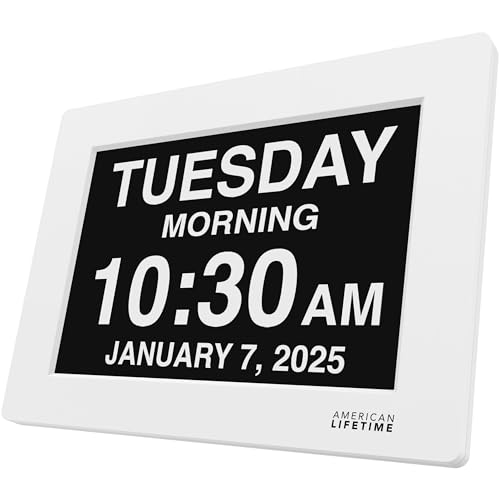
Pros
- Up to 5 daily alarms for medication or appointments
- 2026 model has a high-contrast day and date screen
- 5-alarm setup helps caregivers schedule daily prompts
Cons
- Large display may take up more bedside space
- Manual setup may still require caregiver help

Pros
- 7-inch IPS screen has bold, high-contrast numbers
- 1024×600 resolution helps text stay crisp at angles
- 6 alarms and 10 reminders support daily schedules
- 5 tones and 5 volume levels offer alert flexibility
Cons
- 7-inch screen may be too large for small nightstands
- Remote control adds another item to keep track of
A Closer Look at Our Top Pick
The SSYA Digital Calendar is the easiest place to start for many households because its strengths are the basics that matter most: a 7-inch 1024×600 HD LCD, clearly written day and date information, and 12 alarm modes for daily routines. On paper, that combination makes it useful for a person who needs orientation cues more than a decorative clock. The display is meant to spell out the time rather than rely on abbreviations, which can be helpful when short labels create extra mental work. Caregivers can use the alarm modes for meals, medicine, appointments, or other repeated prompts.
The trade-offs are practical ones. It needs the included A/C adapter for normal operation, so placement depends on an outlet and a safe cord path. Its auto dimming schedule is fixed at 7 pm and 7 am, which will suit many homes but not every sleep routine. Still, the 7-inch calendar clock with 12 alarm modes offers a careful balance of clear display, reminder support, and simple daily visibility. If your parent does not need voice time announcements or a very large number of reminders, this is a sensible first comparison point.
Find Your Situation
- the SSYA Digital Calendar: suits a person who needs the day, date, and time spelled out on a 7-inch 1024×600 HD screen, with 12 alarm modes for meals, medicine, or appointments. Watch out: it needs the included A/C adapter for normal use.
- the Nimukol Digital Alarm: suits a person who benefits from a 7 inch display plus voice time announcement in 9 languages. Watch out: the remote and rear buttons may be hard for shaky hands.
- the S Soobest Soobest: suits a caregiver who wants up to 20 alarms for medicine, meals, showers, and other daily prompts. Watch out: the battery memory saves settings but does not power the display.
- the Mitoart Digital Alarm: suits a person who wants large day, date, and time text plus voice announcements in 9 languages. Watch out: the voice button requires pressing the back, remote, or OK key.
- the American Lifetime New: suits a bedside or tabletop spot where a high-contrast day and date screen and up to 5 daily alarms are enough. Watch out: the large display may take up more bedside space.
- the FLYRUIT 7: suits a person who needs a 7-inch IPS screen, 6 alarms, and 10 icon reminders for daily routines. Watch out: the remote control adds another item to keep track of.
How We Narrowed It Down
We compared published specifications rather than handling the products, focusing on features that matter in a home routine: screen size, date and day wording, alarm count, brightness behavior, voice cues, and setup trade-offs. We excluded choices that did not clearly state core daily-orientation features such as day, date, time, or reminder support. We also gave less weight to decorative extras because a clock for this situation should first be readable, steady, and easy for a caregiver to manage. If your parent has vision changes, balance concerns, or trouble reaching controls, ask a doctor or physical therapist about placement and safe cord routing; the National Institute on Aging also offers practical home safety guidance on falls and falls prevention that can help you think through the room around the clock.
What to Look For
Start with the words on the screen
A dementia clock is only helpful if the person can read it from the usual chair, bed, or kitchen seat. A 7-inch screen can be enough at close range, especially when it shows the day, month, and date in large text. Look for wording that is direct rather than abbreviated, because shorter labels can be less clear. If your parent often asks what day it is, prioritize the display before you compare alarm counts.
Match alarms to the real routine
Alarm counts vary a lot, from 5 daily alarms to up to 20 alarms on the products compared here. More alarms can help when one person needs several medication, meal, shower, or appointment prompts across the day. Fewer alarms may be simpler if the routine is stable and a caregiver only needs a few reminders. The goal is not the biggest number, but the number that can be set and maintained without confusion.
Think about sound before volume
Some clocks offer several tones, adjustable volume, or spoken time cues. A voice announcement in 9 languages may help a person who responds better to speech than to beeps. A model with 5 tones and 5 volume levels gives a caregiver more ways to choose an alert that is noticeable without being harsh. Consider whether the person is likely to press a button for voice time, since some controls may be on the back or remote.
Check brightness for day and night
Auto dimming can make a display easier to live with in a bedroom, but fixed schedules may not fit every household. Several clocks change brightness at 7 pm and 7 am, while one lists a shift from 50 to 250 cd/m². A brighter daytime screen can help in a sunny room, but a dimmer night setting may feel calmer near the bed, as can a home air purifier. If your parent sleeps at unusual hours, a fixed dimming schedule deserves extra thought.
Before you buy, choose the right spot
Placement matters as much as the clock itself. Plug-in designs need an outlet for daily use, and the cord should not cross a walking path. A 7-inch display may be clear on a nightstand but too small across a larger room. If your parent uses a walker, cane, or favorite chair, decide where the clock will sit before choosing a screen size, and consider car door handles for outings.
Look at caregiver setup, not just daily use
Some clocks are simple for the person to read but still need caregiver help for setup. A remote can make programming easier from a chair, but it also creates 1 more item to keep nearby. Rear buttons may be awkward for shaky hands or for a clock placed against a wall. For a routine with several reminders, a clock with up to 20 alarms may be worth the added setup time.
When this is not enough
A clock can support orientation and routine, but it should not be the only support if the person needs help with meals, medications, transportation, or home services. If reminders are being missed often, consider pairing the clock with caregiver check-ins or local aging services. The Eldercare Locator can connect families with local support, and its phone number is 1-800-677-1116. For a person who responds well to visual prompts, a 7-inch IPS screen with icon reminders may still be a useful part of the plan.
Quick Tips for Choosing
- Choose the clearest day and date display first.
- Count the reminders your parent actually needs.
- Check whether the clock needs an outlet nearby.
- Avoid placing cords across walking paths.
- Use voice cues only if the controls are reachable.
- Pick a screen size for the viewing distance.
Frequently Asked Questions
What makes a dementia clock different from a regular digital clock?
A dementia clock usually shows the day, date, and time together in large, plain text. Many also add alarms or reminders for daily routines, with counts ranging from 5 daily alarms to up to 20 alarms. It may also be considered among presents for an elderly Lady.
Is a 7-inch screen large enough?
A 7-inch screen can work well on a bedside table, desk, or kitchen counter. Across a larger room, it may be harder to read, so viewing distance matters.
Do these clocks work during a power outage?
Some clocks include battery memory that saves settings, but that does not always mean the display stays powered. For plug-in designs, plan on using an outlet for daily operation.
How many alarms should I look for?
Start with the routine, not the largest number. A person with a few daily prompts may be fine with 5 alarms, while a more detailed schedule may need 12 or more.
Are voice announcements useful?
Voice announcements can help when spoken cues are easier to process than reading the screen. Some clocks support voice time announcements in 9 languages, but the person may need to press a button or use a remote.
Should the clock show the part of the day?
It can be helpful when morning, afternoon, evening, or night feels unclear. One product compared here uses 6 time periods to label different parts of the day.
Is auto dimming important?
Auto dimming can make the clock easier to live with in changing light. Some schedules are fixed at 7 pm and 7 am, so check whether that fits the household routine.
Can a clock replace medication management?
No. A clock can provide reminders, but medication routines may still need caregiver oversight, pharmacy packaging, or clinician guidance.
Where should the clock go?
Put it where the person naturally looks for time cues, such as near a favorite chair, bed, or kitchen table. For plug-in models, keep the cord out of regular walking paths.
What if my parent ignores alarms?
Try a clearer placement, a different tone, or a simpler reminder schedule. If alarms are often missed, add human check-ins or local support rather than relying on the clock alone.
Which One to Start With
If you want the safest first choice on paper, start with the SSYA Digital Calendar. Its 7-inch 1024×600 HD screen, non-abbreviated wording, 12 alarm modes, and 5 brightness levels cover the main needs without making the feature list feel crowded. It is especially sensible when your parent asks about the day or date often and a caregiver wants reminders for meals, medicine, appointments, or daily routines. The fixed 7 pm and 7 am dimming schedule is the main fit question.
If the routine is more complicated, choose a date clock with up to 20 alarms instead. That setup gives caregivers more room for medication, meals, showers, and other repeated prompts, plus 6 time-period labels for parts of the day. The plug-in design and 7-inch screen are worth considering before you decide where it will sit.
If spoken cues matter, look at the Nimukol Digital Alarm. Its 7 inch screen, voice announcement support in 9 languages, and 250cd/㎡ daytime brightness make it a strong option for a person who benefits from hearing the time as well as seeing it. The trade-off is control access: the remote and rear buttons may not suit shaky hands. For a person who mainly needs icons and flexible alert sounds, the FLYRUIT 7 is also worth comparing because it has 6 alarms, 10 reminders, 5 tones, and 5 volume levels.