

Small design choices can make home readings easier or harder: cuff size, screen contrast, memory, and whether the person has to manage an app all matter before the first reading starts. The best blood pressure monitors for seniors should match the arm or wrist size, show numbers clearly, and fit the way your parent or the person actually checks at home. After comparing 6 options on paper, the iHealth Track Smart stands out for large on-device readings and 99 stored results, while the Andesfit Upper Arm is worth a look when larger cuffs, a 6-inch color display, and 2-user memory are priorities.
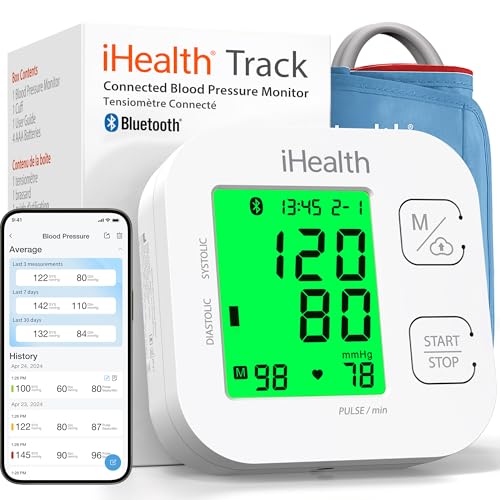
Pros
- Wide-range cuff fits 8.7-16.5 inch upper arms
- Stores 99 readings on the monitor for quick review
- Bluetooth 4.0 app supports unlimited phone records
- Includes 4 AAA batteries and a 12-month warranty
Cons
- Requires iOS 12.0 or Android 9.0 for app tracking
- Cuff tops out at 16.5 inches, so larger arms may not fit
- Only 99 readings stored on the monitor without the app

Pros
- Stores 240 readings across 2 separate users
- 35-second automatic measurement cycle is quick
- Type-C rechargeable design avoids battery swaps
- Large LED backlit display aids low-light reading
Cons
- Wrist cuff fit is limited to 4.92 to 8.46 inches
- Wrist monitors can be position-sensitive during checks
- Voice feature may disturb others unless volume is off
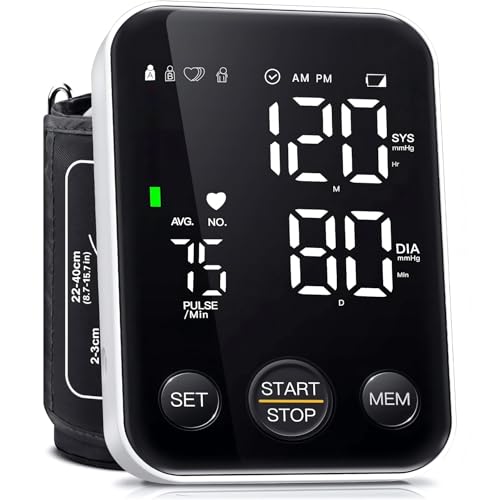
Pros
- Stores 240 readings split between two users
- Backlit LED shows large digits within 1 minute
- Cuff adjusts from 8.7 to 15.7 inches around arm
- Runs on 3AA batteries or Type-C cable power
Cons
- Not rechargeable despite having a Type-C port
- Cuff may not fit arms over 15.7 inches

Pros
- Wide-range D-ring cuff fits arms 9 to 17 inches
- Stores 14 readings directly on the monitor
- Bluetooth syncs readings with OMRON Connect app
- Includes 4 AA batteries and a storage case
Cons
- On-device memory is limited to 14 readings
- Upper-arm cuff may not fit arms over 17 inches
- Bluetooth app setup may be a hurdle for some

Pros
- Wide-range D-ring cuff fits arms from 9 to 17 inches
- One-touch operation starts readings with 1 button
- Body Movement Detection gives 1 alert for motion
Cons
- Upper-arm cuff may be hard to place without help
- D-ring cuff can feel awkward on very thin arms
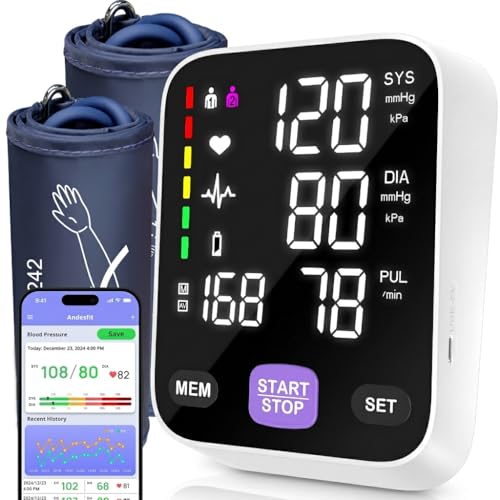
Pros
- Includes 17-inch and 21-inch cuffs for larger arms
- 6-inch color LED display uses large, clear numbers
- Stores 199 readings each for 2 separate users
- Bluetooth app stores unlimited readings on 1 phone
Cons
- App setup may be challenging for non-smartphone users
- Upper-arm cuff placement can require caregiver help
A Closer Look at Our Top Pick
The iHealth Track Smart is the easiest starting point for many older adults because it balances a wide upper-arm cuff, readable results, and useful memory without making the phone app mandatory for every check. Its cuff fits upper arms from 8.7 to 16.5 inches, which covers many adults while still giving a clear limit to measure before buying. The monitor stores 99 readings on the device, so a caregiver can review recent numbers at home without opening a phone. It also uses color coding, which can help the person notice that one reading is different from another without sorting through a long record.
The trade-off is app dependence if you want a longer history. Bluetooth 4.0 supports unlimited phone records, but app tracking requires iOS 12.0 or Android 9.0. That is reasonable for families who already use a smartphone, but it may add friction for someone who wants a monitor only. The cuff also tops out at 16.5 inches, so measure the upper arm first if fit is uncertain. For many households, the included 4 AAA batteries, 12-month warranty, and 99-reading device memory make it a practical first choice rather than a gadget that demands too much setup.
Find Your Situation
- the iHealth Track Smart: suits an older adult who wants an upper-arm monitor with an 8.7 to 16.5 inch cuff and 99 readings saved on the device. Watch out: app tracking needs iOS 12.0 or Android 9.0.
- the Oklar Wrist Blood: suits the person who wants a compact wrist unit with a 4.92 to 8.46 inch cuff and 240 readings across 2 users. Watch out: wrist monitors can be position-sensitive during checks.
- the Oklar FDA Cleared: suits a home that needs simple one-button use, a backlit LED, and an 8.7 to 15.7 inch upper-arm cuff. Watch out: the Type-C port powers the monitor but does not make it rechargeable.
- the OMRON Bronze Blood: suits caregivers who want an upper-arm cuff from 9 to 17 inches plus Bluetooth app storage and report sharing. Watch out: the monitor itself stores only 14 readings.
- the OMRON Iron Blood: suits daily checks where one-touch operation and a body movement alert are more important than app features. Watch out: the D-ring cuff may feel awkward on very thin arms.
- the Andesfit Upper Arm: suits households needing larger cuffs, since it includes 17-inch and 21-inch cuffs plus a 6-inch color display. Watch out: app setup may be challenging for non-smartphone users.
How We Narrowed It Down
We compared published specifications rather than handling the products, focusing on the details that change daily use for older adults and caregivers: cuff range, display type, memory, power source, app support, and whether 2 people can keep separate records. We excluded choices that did not give a clear cuff size, did not show how readings are stored, or depended too heavily on a phone without helpful on-device information. We also gave extra attention to monitors with larger displays, one-button operation, or more than 14 saved readings because those features can reduce confusion during routine checks. Ask a doctor or physical therapist for help with cuff placement, positioning, and whether a wrist or upper-arm style fits the person’s needs. For general home safety planning, the National Institute on Aging offers practical advice on movement, lighting, and household setup at falls and falls prevention.
What to Look For
Start with the cuff, not the screen
Cuff fit is the first filter because a clear display cannot make up for a cuff that does not fit the arm or wrist. Upper-arm options here range from 8.7 inches up to 21 inches, while the wrist option ranges from 4.92 to 8.46 inches. Measure the person’s arm where the cuff will sit before comparing features. If the person has a larger upper arm, a monitor with 17-inch and 21-inch cuffs may be a better starting point.
Choose memory that matches who checks the numbers
On-device memory matters when a caregiver wants to review recent readings without hunting through a phone. Some monitors store 14 readings, while others store 99 or 240 readings. A 2-user memory setup is helpful when spouses or housemates both check at home. If only one person tracks readings and uses a phone comfortably, app storage can be useful without being the main reason to buy.
Look for a display your parent can read in the room they use
Large digits and backlighting can matter more than extra app features, especially if checks happen in a bedroom or dim kitchen. The Oklar upper-arm model shows large digits on a backlit LED within 1 minute. The Andesfit model uses a 6-inch color LED display, which may be easier for a caregiver to read from a short distance. If low-light reading is common, prioritize screen clarity before Bluetooth.
Before you buy, decide who will place the cuff
Upper-arm cuffs can be straightforward for some people and difficult for others, especially if shoulder movement is limited. The OMRON Iron uses a 9 to 17 inch D-ring cuff, but its own trade-off is that placement may be hard without help. Wrist monitors are smaller, but wrist position can affect the check. If a caregiver will usually help, an upper-arm cuff with a wider fit range may be the calmer choice, while pill cutters and crushers address medication prep.
Make power simple enough for everyday use
Power setup should match the person’s routine, like with a pill dispenser. The iHealth model includes 4 AAA batteries, while the OMRON Bronze includes 4 AA batteries. The Oklar wrist monitor is Type-C rechargeable, which avoids battery swaps. The Oklar upper-arm monitor can run on 3 AA batteries or Type-C cable power, but it is not rechargeable.
When this is not enough, add local help
A monitor can store readings, but it cannot solve every practical question about home routines, transportation, or caregiver support. If the person needs help coordinating services, the Eldercare Locator connects older adults and caregivers with local support and can also be reached at 1-800-677-1116. This can be useful when home checks are only 1 part of a broader care plan. Keep the monitor choice simple so it supports the routine instead of becoming another task.
Think carefully before relying on an app
Bluetooth can be helpful when a doctor or caregiver wants a longer record, but it should not be the only way to see recent results. The iHealth app requires iOS 12.0 or Android 9.0, and the OMRON Bronze uses the OMRON Connect app for syncing. A monitor with useful on-device memory is easier when the person does not want to manage phone steps. For app-friendly households, a monitor with Bluetooth report sharing can make trend review more organized.
Quick Tips for Choosing
- Measure the arm or wrist before comparing features.
- Choose upper-arm cuffs first if placement is manageable.
- Pick 2-user memory when more than 1 person will track readings.
- Favor large backlit numbers for dim rooms.
- Do not depend on an app if your parent dislikes phone setup.
- Check whether batteries or Type-C power fits the routine.
Frequently Asked Questions
Is an upper-arm monitor better for an older adult?
An upper-arm monitor is often the simpler default when the person can place the cuff or has help. In this group, upper-arm cuff ranges run from 8.7 inches up to 21 inches.
When does a wrist monitor make sense?
A wrist monitor can make sense when the person wants a compact unit and the cuff fits the wrist. One wrist cuff here fits 4.92 to 8.46 inches, but wrist position matters during checks.
How much memory should a home monitor have?
That depends on who reviews the readings. A monitor with 99 or 240 stored readings gives more room than one with 14 readings.
Do 2 people need separate user profiles?
Separate profiles help keep records from mixing together. Several options here store readings for 2 users, including models with 199 or 240 readings split by person.
Is Bluetooth necessary?
No, Bluetooth is not necessary if the person only needs to see recent results on the monitor. It can help when a caregiver wants app storage or report sharing, or compares blood pressure smartwatches.
What cuff size should I look for?
Measure the upper arm or wrist where the cuff will sit. The choices here range from a 4.92 inch wrist minimum to a 21 inch upper-arm cuff maximum.
Are rechargeable monitors easier?
They can be easier if the person remembers to charge small devices. One wrist model uses Type-C rechargeable power, while other models use AA or AAA batteries.
What if my parent has trouble seeing the screen?
Look for large digits, a backlit LED, or a larger color display. One option has a 6-inch color LED display, and another shows large digits within 1 minute.
What if the cuff is hard to put on alone?
Consider whether a caregiver can help with placement. Some upper-arm cuffs, including D-ring styles, may be awkward for very thin arms or hard to position with 1 hand.
Should readings be shared with a doctor?
Ask the doctor how they prefer to review home readings. Some monitors support app records or report sharing, while others are better for quick on-device review.
Which One to Start With
Start with the iHealth Track Smart if you want the most balanced first choice for an older adult who can use an upper-arm cuff from 8.7 to 16.5 inches. It gives you 99 readings on the monitor, color coding, Bluetooth 4.0, and included 4 AAA batteries, so it works for both simple home review and longer phone tracking. The main reason to skip it is fit: if the person’s upper arm is over 16.5 inches, choose a larger-cuff option instead.
If fit is the main concern, start with the Andesfit Upper Arm. Its 17-inch and 21-inch cuffs make it the clearest choice in this group for larger arms, and the 6-inch color display is helpful when numbers need to be read quickly. It also stores 199 readings each for 2 users, which suits a caregiver tracking more than 1 person at home.
If your parent wants the smallest setup and does not want battery swaps, consider a rechargeable wrist monitor with voice readouts. It stores 240 readings across 2 users and has a 35-second automatic cycle. Choose it only if the 4.92 to 8.46 inch wrist cuff fits and the person can keep the wrist positioned consistently during checks.