

As people age, standard phone designs often become harder to use. Buttons shrink, ringers stay quiet, and displays tilt away from view. The result is missed calls and the stress that comes with it. Finding the best phones for elderly people means matching a phone’s features to your parent’s vision, hearing, and living situation. Whether your parent lives alone, with family, or moves between rooms, a phone built for accessibility can restore confidence and keep them connected. We compared three landline options designed specifically for older adults: the The SWISSVOICE Big Button stands out for balancing simplicity with home flexibility. It ships with two handsets: a corded base unit and a cordless handset, so your parent can answer from the kitchen, bedroom, or living room without walking to a desk. The ringer reaches 90 decibels, loud enough to cut through background noise or hearing loss without startling everyone in the house. Four large photo memory buttons let your parent store pictures of their most-called contacts and dial them with a single tap, eliminating the need to find and punch in a full number. The phone works with hearing aids and standard landline service. It accepts up to 3 additional cordless handsets if you want to place phones in multiple rooms later. The answering machine is built in, so your parent won’t miss messages when they step away. Trade-offs exist: it requires an active landline, which not all homes maintain anymore, and it cannot connect to cell phones or mobile networks. For households where a landline is already in place and your parent spends time in different areas of the home, this model solves the mobility problem that keeps many older adults tethered to a single desk phone. We compared the published specifications of landline phones marketed for older adults with hearing or vision challenges. We looked for phones that offered large buttons, adjustable ringer volume, and simplified calling methods. We excluded cordless-only models without a base unit, since they tend to have smaller buttons and less stable audio. We also excluded mobile phones in this guide because they require different accessibility approaches than landline models do. If your parent struggles with dexterity or memory, talking with their doctor or a physical therapist about phone use can reveal whether adaptive equipment might help. The National Institute on Aging provides guidance on home safety and communication for older adults. Buttons smaller than half an inch across are hard to press accurately, especially for people with arthritis or tremors. The phones here offer buttons roughly 3 to 4 times the size of standard desk phones. Wider spacing between buttons reduces accidental misdials. Test a model in person if you can, since what feels comfortable varies by hand size and dexterity. A standard phone ringer measures around 70 to 75 decibels. The models in this guide range from 90 to 110+ decibels. At 90 decibels, a ringer sounds like a car wash. At 110 decibels, it’s comparable to a loud alarm. If your parent lives alone or often has the TV on, choose a phone for hard of hearing users with 90 decibels or higher. Many also let you adjust the volume, so you can reduce it once installed. Storing phone numbers as pictures lets your parent call family and friends by tapping a button with a photo instead of scrolling through a directory. The phones here offer 4 to 9 photo buttons. If your parent forgets numbers easily or has shaky hands, photo memory is a major convenience. It also works well for people with dementia who recognize faces better than names, just as handheld magnifiers help those with vision challenges. A corded phone works during power outages because it draws power from the phone line itself. Cordless and mobile phones require electricity. If your parent lives alone or in an area with frequent outages, a corded model offers peace of mind. The trade-off is that they stay in one place, so your parent must walk to the phone to answer. If your parent spends time in the kitchen, bedroom, and living room, a cordless handset means they can reach a phone from anywhere without installing multiple phones. A two-handset system like the SWISSVOICE model balances this mobility with the emergency reliability of a corded base unit. The cordless handset typically has a range of 200 to 300 feet indoors. All three phones in this guide require an active landline. If your parent uses only a cell phone, these models won’t work. Some older adults keep a landline for safety or because it’s bundled with their internet service. Ask whether they have an active line before purchasing. If they don’t, phones designed for seniors with mobile options or a cell phone plan may be the answer instead. If your parent lives in a multi-story home or spends much time away from the main phone, adding a second or third handset in different rooms reduces the chance of missed calls. The SWISSVOICE model accepts up to 3 additional cordless handsets. Corded models like the AT&T can be paired with cordless options from the same manufacturer, though this requires checking compatibility. Talk with the Eldercare Locator if you need help finding local support services or advice on setting up a safe home communication plan. No. Senior phones use standard landline service. Your parent’s existing phone plan works with any of these models. Some phone companies offer plans discounted for seniors, but the phone itself doesn’t trigger a special plan requirement. Check with the phone company to confirm the line is active and supports the features your parent needs, such as caller ID. Yes, if the phone is hearing aid compatible. The SWISSVOICE model is labeled as hearing aid compatible, meaning it meets standards to avoid feedback and interference. Other models may also work with hearing aids, but it depends on the brand and type of aid. Ask your parent’s audiologist whether a specific phone will work before buying. Cordless handsets only work when charged. If your parent forgets, the handset will die during the day and they won’t be able to answer calls away from the base unit. A two-handset system like the SWISSVOICE model solves this because the corded base unit always works. You can also set a daily alarm on your phone to remind your parent to dock the cordless handset each night. Most likely, yes, if the facility has standard phone jacks. Ask the facility about their phone service and whether they allow residents to install their own phones. Some assisted living homes provide phones as part of the service, while others let residents bring personal phones. Always ask before purchasing. Corded desk phones are ideal for seated use. They sit upright on a table, and the cord keeps them in place. Cordless handsets can be used sitting or standing but require the user to hold them. For someone with weak grip strength, a corded phone on a desk that tilts toward the user is easiest to see and use. The AT&T model has a tilting display for this reason. It depends on the model. Some phones require you to be at the phone itself to add contacts. Others may allow remote programming via a computer or app if the feature exists. For the models in this guide, check the instruction manual. In general, keep your parent nearby the first time you program a phone so they learn how to do it themselves in the future. First, ensure the ringer is actually on. Many phones have an on-off switch that gets accidentally turned off. If the ringer is on and still inaudible, try adding a visual alert. Some phones include an LED flash that blinks when a call comes in, alerting deaf or hard-of-hearing users. You can also install an external bell ringer that amplifies the signal further, though this requires checking compatibility with your phone model. No. Standard landline phones plug directly into existing phone jacks and work immediately. However, if your parent’s landline has a modem or other equipment connected, make sure you’re plugging into the correct jack. If you’re unsure, call your parent’s phone company; they can confirm the setup in minutes. Corded phones are impractical for travel because they require a phone jack. Cordless handsets can be taken to another location if that location has a compatible base unit, but most people don’t travel with phone bases. For travelers, a mobile phone with large-text settings and voice calling is more practical. These landline phones are designed for home use. A cordless phone requires a base unit plugged into a landline and only works within range of that base (usually 200-300 feet indoors). A cell phone connects to cellular networks and works anywhere with service. Cordless phones have better sound quality and larger buttons but are limited to home use. Cell phones offer mobility but often have smaller interfaces and more complicated menus. Your best starting point depends on your parent’s home setup, mobility, and hearing ability. If your parent spends all day in one room, sits at a desk, and wants the easiest emergency-proof option, the corded desk phone is reliable and compact. It works during power outages, requires no charging, and sits stably on a table. The 50-name caller ID history helps your parent screen calls. The only drawback is that they must walk to the phone to answer, and you’ll need to buy 4 AA batteries separately for the caller ID feature. If your parent moves around the house, wants to answer from different rooms, and hears well enough that a 90-decibel ringer is loud enough, the is the most practical choice. The two-handset system gives freedom to move while keeping a reliable corded base unit for emergencies. The 90-decibel ringer is louder than standard phones but not so loud that it startles you. Four photo memory buttons cover most family contacts, and the built-in answering machine catches calls when your parent steps out. The phone requires a working landline, which most homes have if they already use a phone. If your parent has memory loss, arthritis that makes number-punching hard, or needs hands-free calling because they struggle to hold a handset, the is designed for that situation. The 9 photo memory buttons plus hands-free speakerphone make calling effortless. The 110+ decibel ringer is the loudest here, and the LED flash warns your parent of incoming calls even if they don’t hear the ringer. Programming takes only 20 seconds with 4 simple steps, so you can set it up together without frustration. The trade-off is that it’s corded and stores only 9 contacts, so it works best for people with a small, stable list of loved ones they call regularly. Choose this model if simplicity and memory support matter more than having many phone numbers available. A final note: regardless of which model you choose, install the phone in a place your parent uses regularly and can reach safely. Put it near where they sit most often or near their bed. Test the ringer volume and button feel yourself before deciding it’s the right fit. Phones that work well in a store sometimes feel different at home, and your parent’s feedback matters as much as the specifications. If you’re unsure which phone suits them best, start with the SWISSVOICE model. Its combination of loudness, mobility, and photo memory covers most older adults’ needs and gives your parent room to grow as their hearing or memory changes over time. Pros
Cons
Pros
Cons
Pros
Cons
A Closer Look at Our Top Pick
Find Your Situation
How We Narrowed It Down
What to Look For
Button size and spacing matter more than you think
Ringer volume needs a real number
Photo memory buttons beat number memorization
Corded phones are more reliable in emergencies
Cordless handsets give freedom to move
Before you buy, check your parent’s landline status
When a single phone is not enough, plan for more handsets
Quick Tips for Choosing
Frequently Asked Questions
Do I need a special phone plan for a senior phone?
Can I connect a senior phone to my parent’s hearing aids?
What if my parent forgets to plug in a cordless handset?
Will these phones work in a retirement community or assisted living facility?
What if my parent needs to use a phone while sitting down?
Can I program a phone from another room?
What if the ringer is still too quiet even at maximum volume?
Do I need to call the phone company before installing a new phone?
Can my parent take one of these phones when traveling?
What’s the difference between a cordless phone and a cell phone?
Which One to Start With
1

A corded desk phone with extra-large buttons and tiltable display designed for seniors and those with vision challenges. The Audio Assist volume boost and adjustable extra-loud ringer help ensure calls aren't missed by users with hearing difficulties.
Pros & Cons
2

A landline phone with 4 large photo memory buttons and adjustable ringer volume up to 90 db, designed for older adults with hearing or vision challenges. The package includes 2 handsets: one corded base unit and one cordless handset for flexibility around the home.
Pros & Cons
3
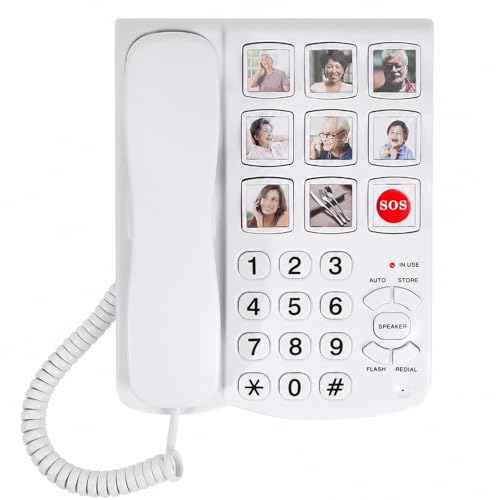
A corded landline phone designed for seniors and people with dementia, featuring 9 photo memory buttons for one-touch calling. The 110dB+ ringtone and hands-free speakerphone make it accessible for those with hearing loss or limited mobility.
Pros & Cons