

When the TV volume disturbs your household or you struggle to hear dialogue clearly, wireless headphones offer a straightforward solution. They connect to your television through a small transmitter dock and let you adjust your personal listening level independently. For older adults who watch regularly, the best wireless headphones for tv listening combine simple setup, long battery life so you do not charge constantly, and comfort during extended viewing. We compared the specifications of three models designed with seniors in mind to help you find the right fit for your situation and your parent’s needs.
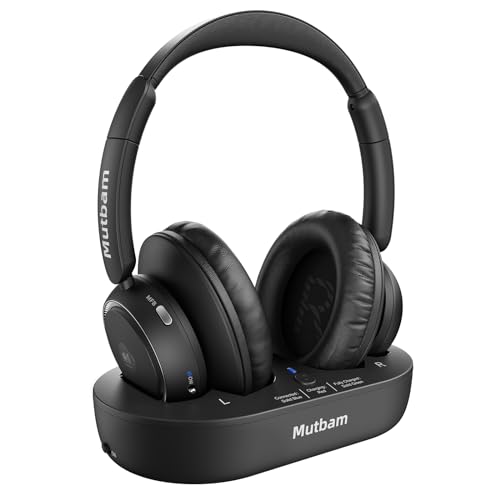
Pros
- Up to 65 hours of listening time between charges
- Connects via Optical, 3.5mm AUX, or RCA inputs
- 100 ft wireless range with low-latency audio
- Auto-reconnect feature powers on and pairs automatically
Cons
- Requires dedicated transmitter dock for operation
- May need TV sound settings adjusted for Optical connection
- Charging dock takes up space near television

Pros
- Up to 65 hours of TV listening per charge
- Optical, 3.5 mm AUX, and RCA inputs for TVs
- Protein leather ear cushions for longer viewing
Cons
- Requires transmitter setup and a nearby power outlet
- Over-ear protein leather cups may feel warm during long sessions

Pros
- 40-hour battery life means a full week of viewing without recharging
- Multiple cable options: optical, 3.5mm AUX, and RCA for broad TV compatibility
- Bluetooth 5.4 technology delivers latency below 40ms for synced audio
- 2-in-1 charging base keeps headphones and receiver organized in one spot
Cons
- Over-ear design may feel heavy during extended viewing sessions
- Requires initial setup with multiple cable connections for first-time users
- No mention of adjustable headband sizing for different head shapes
A Closer Look at Our Top Pick
The Mutbam Wireless Headphones stand out for their combination of exceptional battery endurance and straightforward automatic pairing. After comparing all three models on paper, the Mutbam impressed most with its 65-hour battery life per charge, which means a full week of daily television watching before you need to plug it in. The auto-reconnect feature eliminates a common frustration: manually selecting the headphones from your TV’s Bluetooth menu every evening. Instead, when you power on the headphones, they pair automatically with the transmitter dock. This design reflects a clear understanding of what makes technology comfortable for people who watch television regularly but do not want to troubleshoot connection problems.
The Mutbam connects through your choice of three input types: optical cable, standard 3.5mm audio jack, or RCA cables. This flexibility matters because older televisions and entertainment systems use different connection standards. The wireless range extends to 100 feet, which means you can wear the headphones in another room if needed, and the low-latency audio keeps sound synchronized with on-screen action during movies and sports. The main trade-off is that the transmitter dock takes up desk or shelf space near your television, and you will need to have that dock powered and within range. For someone who values battery longevity and hassle-free daily use above all else, this model delivers.
Find Your Situation
- The Mutbam Wireless Headphones: Best for someone who watches every day and wants to charge only once weekly. Watch out: The transmitter dock requires dedicated space near your television and a power outlet.
- The NOUUI Wireless: Best for households where comfort during long viewing sessions and easy setup matter most. Watch out: The bulkier battery and tight noise isolation may block household sounds or alerts you need to hear.
- The Earbay Wireless Headphones: Best for someone who wants a compact charging solution and modern Bluetooth 5.4 technology. Watch out: The over-ear design may feel heavy after several hours of continuous wear.
How We Narrowed It Down
Our comparison focused on published specifications for battery life, connection types, wireless range, comfort features, and setup complexity. We did not handle or use any of these products ourselves; instead, we examined the technical data each manufacturer provides to understand what each model offers. We excluded models without dedicated transmitter docks because TV listening typically requires a stable connection point rather than relying on your television’s built-in Bluetooth, which can drop the signal or take several minutes to reconnect. We also prioritized models with battery life of 40 hours or longer, since daily charging defeats the purpose of wireless convenience. If you or your parent experiences hearing difficulties, talking with a doctor or physical therapist about whether hearing aids or other solutions might help is worthwhile. The National Institute on Aging offers guidance on health topics relevant to older adults.
What to Look For
Battery life that matches your viewing habits
Most people do not want to think about charging their headphones every few days. The models here all offer either 40 or 65 hours of listening time per charge. If you watch television 2 to 3 hours daily, a 65-hour battery means charging only once weekly, while a 40-hour battery still covers a full week. Check the manufacturer’s estimate and compare it to your actual daily use to avoid surprises, just as you would when selecting cell phones with reliable battery life.
Connection options for your specific television
Different TVs and older entertainment equipment use different audio outputs. Optical cables, standard 3.5mm audio jacks, and RCA connectors each serve different setups. All three models here support at least two connection types, and the Mutbam and Earbay both offer all three options. Before you buy, check what inputs are available on the back or side of your television to ensure compatibility.
Comfort during extended listening sessions
If you or your parent watches for 4 or more hours at a stretch, headphone weight and cushioning matter. The Mutbam and Earbay are over-ear models, while the NOUUI emphasizes soft protein leather ear cushions. Heavier headphones can cause neck fatigue, so if you find yourself removing headphones frequently, a lighter model may serve you better over time.
Automatic pairing and simple setup
Wireless headphones should connect automatically each time you wear them, not force you to navigate TV menus repeatedly. The Mutbam auto-reconnect feature and the NOUUI automatic pairing feature both handle this without requiring apps or complicated steps. The Earbay requires initial setup with multiple cable connections but then works automatically afterward. If navigating settings menus feels frustrating, prioritize a model with automatic reconnect, much like the straightforward interfaces found on many phones designed for older adults.
Sound quality and latency for television viewing
Latency is the delay between when sound leaves the speaker and when you hear it through wireless headphones. For television, especially sports and movies, latency below 40 milliseconds keeps dialogue and action synchronized. The Earbay’s Bluetooth 5.4 technology delivers latency below 40ms. All three models emphasize clear audio without distortion, which helps with hearing dialogue that might otherwise sound muffled.
Space and placement considerations
Wireless TV headphones require a transmitter dock positioned within your home. The Mutbam and NOUUI use traditional docking stations, while the Earbay offers a 2-in-1 charging base that organizes both the headphones and receiver in one spot. If your television area is crowded or you prefer a compact setup, the Earbay’s unified base takes up less counter or shelf space than two separate devices.
When this is not enough
If you find wireless headphones still do not provide clear enough audio, or if hearing loss is significant, professional evaluation may help. The Eldercare Locator can connect you with local audiology services and hearing specialists in your area. A hearing professional can recommend amplification options tailored to your specific hearing profile.
Quick Tips for Choosing
- Start with battery life: if you watch daily, choose 65 hours over 40 hours to minimize charging chores.
- Verify your television’s audio output ports before ordering to confirm the headphones will connect.
- Test the headphone weight and ear cushion feel if possible at a store before committing, especially if you watch for hours at a time.
- Automatic reconnection is worth prioritizing if you find navigating television menus annoying or confusing.
- Position the transmitter dock in an open area without obstacles to maintain a stable wireless signal.
- Keep the charging dock plugged in and accessible so you remember to charge the headphones weekly or as needed.
Frequently Asked Questions
Do I need to replace my television to use wireless headphones?
No. Wireless TV headphones work with televisions of any age through a separate transmitter dock that connects to your TV’s audio outputs. Even older televisions with only RCA connectors can work with the right model.
Can two people wear wireless TV headphones at the same time?
Most TV headphone systems support only one pair of headphones per transmitter dock. If multiple people in your household want to listen wirelessly at once, you would need to purchase two separate kits, which is a significant added expense.
What if I lose the wireless signal while wearing the headphones?
All three models here are designed to operate within 100 feet of the transmitter dock and will reconnect automatically when you return to range. If the signal drops occasionally, check that the dock is plugged in, not hidden in a cabinet, and within a clear line of sight of where you sit. This same principle of staying within range applies to other wireless devices in your home, such as video calling devices.
Do wireless TV headphones work with hearing aids?
Wireless TV headphones are separate from hearing aids and do not interact with them. If you wear hearing aids, you can still use wireless headphones, though you may find one or both solutions work better depending on your hearing loss and preferences. A hearing specialist can advise on the best approach for your situation.
How long does the transmitter dock take to set up?
Initial setup typically takes 10 to 20 minutes and involves connecting a cable from your television to the dock and plugging the dock into a power outlet. After that first time, the headphones should reconnect automatically each day without further action.
Will the headphones interfere with other wireless devices in my home?
Modern wireless headphones use Bluetooth and digital wireless protocols designed to coexist with WiFi, cordless phones, and other household devices without interference. Interference is rare with the models discussed here.
Can I use wireless TV headphones in multiple rooms?
Wireless TV headphones are designed to work with a single television and transmitter dock. If you move to another room with a different television, you would need to set up a second kit or carry the transmitter dock with you, which defeats the convenience of wireless listening.
What happens if the battery runs out while I am watching?
If the battery is depleted, you can plug the headphones into the charging dock and switch to television speakers while they charge. This is why models with 65-hour battery life are less disruptive if charging happens infrequently.
Are wireless TV headphones safe for people with pacemakers?
Bluetooth and wireless headphone signals do not interfere with pacemakers or other modern medical devices. If you have a pacemaker and have concerns about any wireless device, your cardiologist can provide specific guidance.
Can I adjust the volume on the headphones themselves?
Yes. All three models include volume controls on the headphones so you can adjust listening level independently from your television volume, which is one of the primary benefits of using wireless headphones in a shared household.
Which One to Start With
Your choice depends on what matters most to you and your parent’s daily routine. If television watching is a primary activity and you want to minimize charging tasks, the Mutbam Wireless Headphones with 65-hour battery life and automatic reconnection is the strongest starting point. The auto-pairing feature removes daily frustration, and the 65-hour battery means you charge roughly once per week, fitting naturally into a weekend routine. The three connection options (optical, 3.5mm, and RCA) ensure compatibility with nearly any television age or configuration. The transmitter dock takes up some counter space, but that is a small trade-off for the simplicity and battery endurance you gain.
If comfort during long viewing sessions is your priority and you are willing to spend time on initial setup, the NOUUI Wireless offers soft protein leather ear cushions and the same 65-hour battery life. The model emphasizes comfort for extended listening and also includes automatic pairing with no apps required. The trade-off is that the larger battery capacity makes these headphones bulkier than standard wireless models, and the tight noise isolation might block household sounds you need to hear, such as an alarm or someone calling from another room. This is a good choice if your parent sits for long stretches and wants maximum comfort without frequent battery maintenance.
Choose the Earbay Wireless Headphones if you prefer a compact, unified charging solution and the latest Bluetooth 5.4 technology with low latency below 40 milliseconds. The 2-in-1 charging base keeps both headphones and receiver organized in one compact footprint, and the 40-hour battery still covers a full week of typical viewing. The over-ear design may feel heavier during extended sessions compared to lighter models, and setup requires connecting multiple cables initially. However, once configured, it operates automatically like the other models. If your television area is space-constrained and you value modern wireless standards, this model is the practical starting choice. Whichever model you select, verify your television’s audio connections beforehand and position the transmitter dock in an open area for the strongest signal.