

A door opening at the wrong moment can be easy to miss when a caregiver is in another room, sleeping lightly, or helping with 1 task already. The best door alarms for dementia patients are not about replacing supervision; they are about adding a clear cue when an entry door, bedroom door, window, cabinet, or drawer changes position. After comparing 6 options on paper, I would start most families with the YisTech Caregiver Pager if they need more than 1 receiver, while the PILSAMAS Wi makes more sense when app alerts and sensor history matter.

Pros
- Includes 3 sensors and 2 plug-in receivers
- 260-foot wireless range supports larger homes
- 58 ringtones and 5 volume levels up to 110 dB
- LED indicator helps when chimes are hard to hear
Cons
- Adhesive mounting may loosen on textured door frames
- 0 dB silent mode could be set accidentally
- Requires standard outlets for both receiver units

Pros
- 5-pack covers multiple doors, windows, or drawers
- 125dB and 100dB alarm choices for louder alerts
- 100dB chime mode gives dingdong alerts twice
- 3 LR44 batteries included with up to 13 months life
Cons
- 31-second alarm may be too brief for distant rooms
- 3M tape mounting may not suit rough or damp surfaces
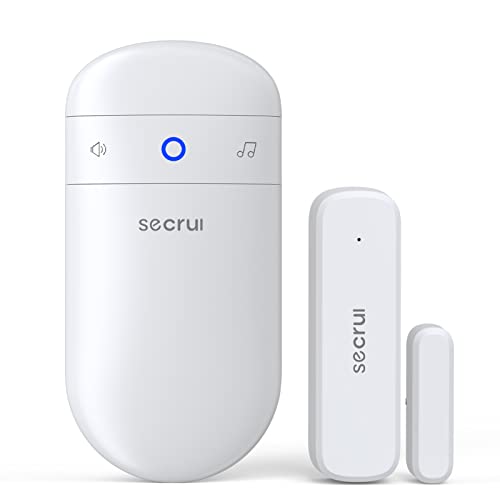
Pros
- 58 chime options for matching different entry doors
- 5 volume levels from mute up to 110 dB
- 500 ft range helps cover larger homes or shops
- 3M tape or screws included for flexible mounting
Cons
- Adhesive 3M mounting may loosen on textured door frames
- 110 dB maximum volume may be too loud in small rooms
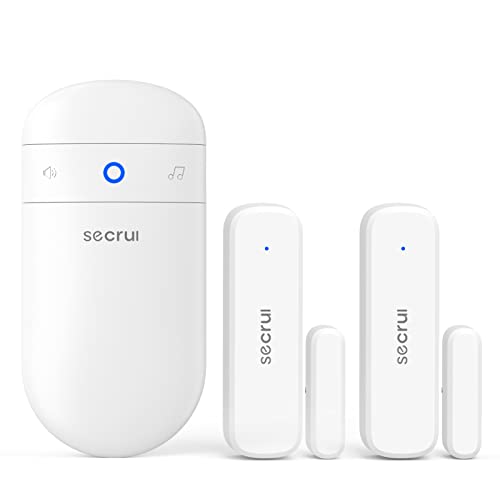
Pros
- 58 chimes and 5 volume levels for flexible alerts
- 0-110 dB range includes mute with visible LED
- 500FT range helps cover larger homes or entries
- Installs with 3M tape or screws for placement options
Cons
- Adhesive 3M tape may loosen on textured door frames
- Door alerts can become annoying in busy households

Pros
- 500-foot range can cover many homes or small stores
- 26 chime options include mute and loud 110dB setting
- 5 volume levels help match room size and hearing needs
- LED indicators add a visual cue for door activity
Cons
- Adhesive mounting may loosen on textured or dusty doors
- Plug-in receiver needs an open standard outlet nearby

Pros
- 2.4GHz Wi-Fi sends free app alerts without a hub
- 328ft receiver range supports whole-home monitoring
- 18 melodies and 4 volume levels, including mute
- AAA batteries included for the door sensors
Cons
- Does not connect to 5GHz Wi-Fi networks at all
- Sensors need arrow alignment within 0.4 inches
- USB-powered receiver needs an available outlet
A Closer Look at Our Top Pick
For many families, the strongest starting point is the YisTech Caregiver Pager because it comes with 3 sensors and 2 plug-in receivers. That matters in a real home: one receiver can sit near a bedroom, while the other can be placed closer to a kitchen, den, or main sitting area. Its 260-foot wireless range is less than the 500-foot range listed for some chime-style options here, but the added receiver gives it a practical advantage when a caregiver moves between rooms. The system also offers 58 ringtones and 5 volume levels up to 110 dB, plus an LED indicator for a visual cue.
On paper, this is the most caregiver-centered kit in the group because it balances coverage, sound, and redundancy without requiring Wi-Fi. The 3 sensors can cover a front door, back door, and a bedroom door, or they can be split among doors and other access points. The trade-offs are worth noting before checkout: both receivers need standard outlets, adhesive mounting may loosen on textured frames, and the 0 dB silent mode could be set by mistake. If your home has reliable outlets in the right places, a 3-sensor pager kit with 2 receivers is the simplest first pick for broad in-home awareness.
Find Your Situation
- the YisTech Caregiver Pager: Best fit if you want 3 sensors, 2 plug-in receivers, and up to 110 dB alerts across a 260-foot range. Watch out: both receivers need standard outlets, and silent mode can be selected.
- the Sanjie Door Window: Best fit if you want 5 magnetic sensors for doors, windows, drawers, or cabinets, with 125 dB and 100 dB alarm choices. Watch out: the 31-second alarm may be too brief if the caregiver is far away.
- the SECRUI Door: Best fit if you need a 500 ft wireless range, 58 chimes, and installation by 3M tape or screws. Watch out: the 110 dB maximum may feel too loud in a small room.
- the SECRUI Door: Best fit if you want 2 sensors, 1 receiver, 58 chimes, and a mute setting with a flashing LED. Watch out: frequent door activity can make alerts annoying in a busy household.
- the SanJie Door Chime: Best fit if you want a simple plug-in receiver, 500-foot range, 26 chime options, and 5 volume levels. Watch out: the receiver needs an open standard outlet nearby.
- the PILSAMAS Wi: Best fit if you want 4 sensor IDs, 2.4GHz Wi-Fi app alerts, and history logs for door or window openings. Watch out: it does not connect to 5GHz Wi-Fi networks.
How We Narrowed It Down
We compared published specifications rather than handling the products, then focused on the details that matter most in a caregiving home: sensor count, receiver count, range, volume levels, visual alerts, mounting method, and power needs. We excluded options that did not clearly describe how a caregiver would be alerted, because a vague alarm is not helpful when your parent is in another room. We also looked for practical trade-offs, such as adhesive limits, outlet needs, Wi-Fi restrictions, and brief alarm duration. A doctor or physical therapist can help you think through walking routes, nighttime routines, and door placement, especially since the National Institute on Aging notes that home hazards and health factors can both affect falls, as explained in its falls and falls prevention guidance. Door alarms are only 1 part of a broader home plan, not a medical treatment.
What to Look For
Start with the door that matters most
Before buying a multi-sensor kit, name the 1 door that creates the most concern in daily life. For many families, that is the front door, a back door, or the door from a bedroom to a hallway. A kit with 3 sensors may be enough for the main exits, while a 5-pack can also cover windows, drawers, or cabinets. The point is to match the kit to the actual routine, not to cover every surface just because you can.
Choose a sound level people will actually keep on
A very loud alarm can help in some homes, but it can also lead people to turn the device down or off. The models here range up to 110 dB or 125 dB, and several include multiple volume settings. That flexibility matters if your parent naps nearby, if a caregiver has hearing changes, or if the receiver sits in a small room. A chime that is tolerable at 5 volume levels may be more useful than an alarm people avoid using.
Think about who needs to hear it
If 1 caregiver is usually in the same general area, a single plug-in receiver may be enough. If caregiving shifts between a bedroom, kitchen, and living room, 2 receivers can reduce missed alerts. This is why a kit with 2 plug-in receivers and 3 sensors stands out for many homes. Visual LED cues also help when sound is muted or when a room is noisy.
For dementia wandering concerns, avoid a setup that depends on memory
When the concern is a door opening without notice, the alarm should not require your parent to remember a step. Magnetic sensors and plug-in receivers are often simpler than app-only arrangements because the alert happens when the door moves. If you choose a Wi-Fi option, confirm the 2.4GHz requirement before you place the sensor, since 5GHz networks are not supported by the Wi-Fi kit here. A setup with sensor names and history logs can help caregivers review patterns after missed openings.
Before you buy, check the frame and the outlet
Several options use adhesive mounting, and adhesive can loosen on textured, dusty, damp, or rough door frames. Some kits include screws or 3M tape, giving you 2 mounting paths. Plug-in receivers need an open standard outlet or USB-powered receiver location, depending on the model. Measure the sensor gap carefully when needed, because 1 Wi-Fi kit requires arrow alignment within 0.4 inches.
When this is not enough, add people and a plan
A door alarm can alert a caregiver, but it does not answer the door, redirect your parent, or solve every overnight routine. If alarms are going off often, that may be a sign to adjust schedules, lighting, locks, supervision, or respite help. The Eldercare Locator can connect families with local support services by phone at 1-800-677-1116. Treat the alarm as 1 cue in a larger care plan.
Decide whether app alerts are worth the setup
App alerts can be helpful when a caregiver is not always near the receiver, especially if the system keeps history logs. The Wi-Fi kit here uses 4 sensor IDs, free app alerts, and a 328ft receiver range. That is useful on paper for reviewing which door opened and when. The trade-off is setup: it requires 2.4GHz Wi-Fi, AAA batteries for the sensors, a USB-powered receiver, and careful sensor alignment. Outside the home, a dementia GPS tracker serves a different role.
Quick Tips for Choosing
- Pick the main exit first, then add sensors only where they solve a real problem.
- Use louder settings for distance, not as the default for every room.
- Choose 2 receivers if caregivers spend time on different floors or ends of the home.
- Use LED cues when sound may be muted, missed, or disruptive.
- Check adhesive surfaces before relying on tape for daily use.
- Write down which ringtone belongs to each door if the kit has 58 chimes.
Frequently Asked Questions
Do door alarms stop a person from leaving?
No. A door alarm gives a sound, light, app alert, or similar cue when a door or window opens. It should be used as part of a supervision and home-safety plan, not as a barrier. Driving plans may use GPS for older drivers.
How loud should a door alarm be?
That depends on distance, hearing, and the room. The options here list maximum levels such as 110 dB or 125 dB, but a lower setting may be better for everyday use.
Is a chime better than a siren?
A chime can be easier to live with if the door opens often during the day. A louder alarm may be useful for a rarely used exit, especially if the caregiver is 1 or more rooms away. A personal alarm is a separate option.
How many sensors do I need?
Start with the main door, then consider a back door, bedroom door, window, cabinet, or drawer. Kits here range from 2 sensors to 5 sensors, so choose based on the home layout.
Do I need Wi-Fi?
No, several door alarms work with local receivers instead of Wi-Fi. Wi-Fi can add app alerts and history logs, but it may require 2.4GHz service and a powered receiver.
What is the advantage of 2 receivers?
Two receivers can place alerts in 2 parts of the home. That helps if a caregiver moves between a bedroom and kitchen, or if the home layout makes 1 receiver hard to hear.
Will adhesive sensors stay on every door?
Not always. Adhesive tape may loosen on textured, dusty, damp, or rough frames, so screws or a smoother surface can be more dependable.
Can I use a door alarm on a cabinet or drawer?
Some magnetic door and window sensors can be placed on drawers or cabinets if the parts align correctly. A 5-pack can make that easier when you want to monitor more than entry doors.
What does mute mode mean?
Mute mode turns off the sound on some receivers, but certain models still show an LED cue. That can help during quiet hours, though it also means a caregiver must be watching for the light.
How should I set different chimes?
If a kit offers 26 or 58 chimes, assign a distinct tone to each important door. Keep the list simple so caregivers can remember what each sound means during a normal day.
Which One to Start With
If you are buying 1 system for a typical home, start with the YisTech Caregiver Pager. Its 3 sensors and 2 receivers make sense for a front door, back door, and bedroom door, while the 260-foot range should cover many ordinary layouts. The 58 ringtones, 5 volume levels, 110 dB maximum, and LED indicators give caregivers several ways to notice an opening without jumping straight to the loudest setting. The main thing to manage is setup: use stable outlets for both receivers and check the adhesive mount after a few days.
If you need to cover more contact points on a smaller budget-minded setup, choose a 5-pack of magnetic door and window sensors instead. It is better suited to doors, windows, drawers, or cabinets, and its 125 dB and 100 dB alarm choices offer strong sound options. I would not make it the first pick for distant rooms, because the 31-second alarm may pass quickly if the caregiver is far away.
If app alerts and logs matter more than extra plug-in receivers, start with the PILSAMAS Wi. The 4 sensor IDs, 2.4GHz Wi-Fi alerts, 328ft receiver range, and history logs are useful when more than 1 caregiver wants to review door activity. Choose it only if the home has compatible Wi-Fi and someone is comfortable keeping the app and receiver working.