

Small gaps in daily communication can turn into repeated phone calls, missed requests, or a caregiver walking room to room just to check whether everything is all right. The best elderly monitoring systems give your parent a simple way to ask for help, while giving family or an in-home caregiver a clearer signal than shouting across the house. Some homes need video and 2-way talk, as with the Zaguoroo Elderly. Others only need a button and receiver, such as the Full House FullHouse. The right choice depends on distance, alert style, privacy comfort, and how many rooms need coverage.

Pros
- One-touch SOS includes Move, Toilet, Water, Help alerts
- Pan-tilt-zoom camera supports 24/7 room monitoring
- Medication reminders run at 0.5, 1, 2, 3, or 4 hours
- Infrared night vision helps caregivers see after dark
- Includes 8 soothing melodies for bedtime routines
Cons
- Reminder timing is limited to preset half-hour intervals
- 2000mAh screen battery still needs regular recharging

Pros
- Up to 1000 feet of open-air wireless range
- 52 melodies help distinguish the alert sound
- 5 volume levels include 0dB silent LED flash
Cons
- Splash proof button cannot be immersed in water
- Range may drop to 500 feet when walls are present
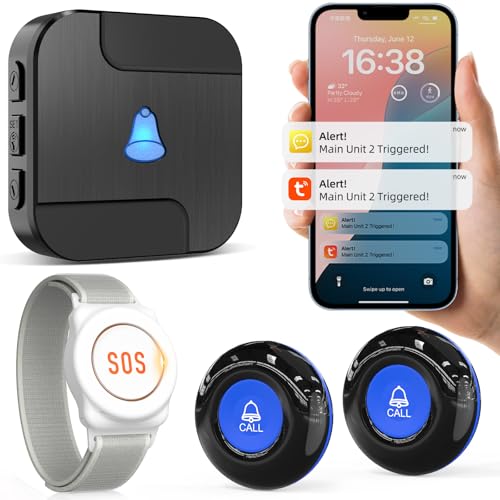
Pros
- 328 ft 433MHz range can reach across most homes
- 20 ringtones and 5 volume levels on receiver
- Tuya app alerts can be shared with family phones
- Lifetime warranty support is offered via Amazon
Cons
- Phone or text alerts require a paid subscription
- Wi-Fi receiver depends on stable home internet
- 328 ft range may fall short in larger properties

Pros
- Includes 10 call buttons for multiple rooms
- Up to 1000 ft range for larger care spaces
- 7-language voice alerts plus 8 alert tones
- Supports up to 255 wireless call buttons
Cons
- Open-area 1000 ft range may shrink through walls
- Repeat alerts may be disruptive in quiet rooms

Pros
- Includes 3 receivers for coverage in multiple rooms
- Comes with 2 call buttons for bed and bathroom
- 500+ ft open-area range supports larger homes
- 55 ringtones and 5 volume levels up to 110db
Cons
- Receivers must stay plugged into electrical outlets
- Open-area 500+ ft range may drop through walls
- Call buttons may be too easy to misplace when carried

Pros
- 1500 ft wireless range for larger home layouts
- 58 ringtones with 5 volume levels up to 120 dB
- IP55 water and dust resistance for daily spills
- Expandable to 30 call buttons and multiple receivers
Cons
- Only 1 call button included for multi-room coverage
- 120 dB top volume may be too loud in close spaces
A Closer Look at Our Top Pick
For many families comparing published specifications, the Zaguoroo Elderly is the most complete starting point because it combines video, audio, 2-way talk, pan-tilt-zoom viewing, and a one-touch SOS button in 1 system. That mix matters when your parent lives apart from the caregiver or spends long stretches in 1 room. The parent-screen battery is listed at 2000mAh, so it can move with the caregiver, but it still needs regular recharging. The camera also includes infrared night vision, which can make late check-ins less disruptive than turning on a bright room light.
The most distinctive feature is the SOS alert set. A press can send separate Move, Toilet, Water, or Help alerts, which may help the caregiver understand what kind of check-in is needed before entering the room. Medication reminders can be set at 0.5, 1, 2, 3, or 4 hours, and the monitor includes 8 soothing melodies for bedtime routines. The trade-off is that those reminder intervals are preset, not fully custom. If your priority is a video monitor with 2-way talk and SOS alerts, this is the most rounded option on paper.
Find Your Situation
- the Zaguoroo Elderly: suits a parent living apart from caregivers who needs camera viewing, 2-way talk, and 4 distinct SOS alert types. Watch out: the 2000mAh screen battery still needs regular recharging.
- the Full House FullHouse: suits an in-home caregiver who wants a simple plug-in receiver with up to 1000 feet of open-air range. Watch out: range may drop to 500 feet when walls are present.
- the CallToU Wi: suits families who want a button press to trigger a loud receiver and phone app alerts through Tuya. Watch out: phone or text alerts require a paid subscription.
- the SYNLETT Wireless Nurse: suits larger homes, small care settings, or shared spaces that need 10 call buttons from the start. Watch out: repeat alerts may feel disruptive in quiet rooms.
- the CallToU Wireless Caregiver: suits a home that needs 3 plug-in receivers and 2 call buttons for bed and bathroom coverage. Watch out: receivers must stay plugged into electrical outlets.
- the STECHRO Wireless: suits larger layouts where a 1500 foot listed range and loud receiver are priorities. Watch out: only 1 call button is included.
How We Narrowed It Down
We compared published specifications rather than handling the products, focusing on practical details that affect day-to-day use: number of call buttons, receiver style, listed range, volume choices, phone alerts, camera features, and setup limits. We excluded options that did not clearly fit an at-home monitoring or caregiver alert role, and we gave less weight to features that sound helpful but do not change how quickly a caregiver receives a signal. For any new weakness, balance issue, dizziness, medication change, or repeated near-miss, ask a doctor or physical therapist what home changes or mobility support may be appropriate. The National Institute on Aging explains fall-related planning in plain language at falls and falls prevention, which can help families think beyond any 1 device.
What to Look For
Start with how help will be requested
The first question is whether your parent will press a button, speak through a monitor, or use both. A call button is simple because it usually needs 1 press, while a camera monitor can also support 2-way talk. If your parent prefers not to be on camera, a pager style system may feel more comfortable. If they like spoken check-ins, a camera and audio monitor for separate households may be easier for family routines.
Match the range to the real home
Range numbers are usually measured in open areas, so walls and appliances can change the result. A listed 1000 foot system may be more than enough for 1 floor, while a 328 foot system may fit a smaller home. If the caregiver works in a garage, yard, or detached space, choose more range than the floor plan seems to require. For multi-room coverage, also count how many receivers or buttons are included.
Think about sound, lights, and quiet hours
Receivers vary widely in how they announce alerts. Some offer 5 volume levels, while others add LED-only or flashing modes for quiet rooms. A top volume of 120 dB may help at a distance, but it can be too loud when the receiver is nearby. Look for enough ringtone choices to tell one alert from another without making the home feel noisy.
Decide whether phone alerts are worth the setup
Phone alerts can help when family members are not in the same room or same home. A Wi-Fi receiver can send app notifications, and family sharing can include more than 1 phone. The trade-off is dependence on stable home internet, and some phone or text alerts require a paid subscription. If the home internet is unreliable, a local receiver may be the steadier first layer. For broader options, compare elderly alert systems.
Before you buy, map the rooms
Write down the places where your parent is most likely to need a quick check-in: bed, bathroom, favorite chair, kitchen, and entry area. A kit with 2 call buttons covers fewer spots than one with 10, but it may still fit a simple routine. Plug-in receivers need open electrical outlets, so count those before choosing a 3 receiver kit. Also decide whether a carried button could be misplaced during the day.
When this is not enough
A monitoring system is only 1 part of support at home. If the person needs transportation, meals, home modification help, or caregiver respite, the Eldercare Locator can connect families with local services, and its phone number is 1-800-677-1116. A device with 1 button cannot solve every routine problem, so pair it with people and services when needs are broader. Keep the system simple enough that it will actually be used.
Plan for expansion before needs change
Some systems are easier to grow than others. One listed system supports up to 255 wireless call buttons, while another expands to 30 call buttons and multiple receivers. If your parent may later spend time in more rooms, expansion can be more useful than buying a second kit. For a large household or shared care space, a nurse call system with 10 buttons gives more placement options from day 1.
Quick Tips for Choosing
- Choose video only if your parent is comfortable with camera check-ins.
- For bathrooms, look for water resistance or waterproof button language.
- Pick more listed range than the home seems to need.
- Use multiple receivers if the caregiver moves between rooms.
- Set volume below the loudest level first, then adjust.
- Test the button from bed, bathroom, kitchen, and favorite chair.
Frequently Asked Questions
Do elderly monitoring systems replace calling 911?
No. These systems are mainly for reaching a caregiver or family member inside or near the home. For urgent medical or safety situations, call 911 or the local emergency number, even if you use senior emergency alert systems.
Is a camera monitor better than a call button?
It depends on the routine. A camera monitor can support 2-way talk and visual check-ins, while a call button keeps things simpler and more private.
How much range does a home need?
A small home may work with 328 feet, while larger layouts may benefit from 1000 feet or 1500 feet. Walls can reduce range, so do a room-by-room test after setup.
Should the button go in the bathroom?
Many families place 1 button near the bathroom because it is a common place to ask for help. If doing that, choose a button described as waterproof, water resistant, or splash proof and follow the product limits.
Are loud alarms always better?
Not always. A receiver that reaches 110 dB or 120 dB can help across distance, but close-up use may call for a lower setting. Volume levels and light alerts give more flexibility.
Can more than one family member get alerts?
Some app-connected systems support family sharing through phone notifications. Local pager systems usually alert the receiver instead of multiple phones.
What if my parent forgets to wear the button?
Place buttons where they are naturally needed, such as beside the bed or near a chair. A kit with 2 or 10 buttons can reduce reliance on carrying 1 button everywhere.
Do these systems need Wi-Fi?
Many pager systems use wireless receivers and do not rely on home internet. App alerts usually need Wi-Fi and a stable connection.
Can one receiver cover the whole home?
Sometimes, especially in a smaller layout with clear signal paths. In larger homes, 3 receivers or a portable pager may be easier than depending on 1 location.
How often should the system be checked?
Test the button and receiver after setup, then repeat whenever furniture, outlets, or internet equipment changes. A quick weekly press can confirm that sound, lights, and placement still work.
Which One to Start With
If you want 1 clear place to begin, start with the situation rather than the feature list. For a parent living separately who would benefit from spoken check-ins and visual confirmation, choose the Zaguoroo Elderly. It gives the caregiver camera viewing, 2-way talk, pan-tilt-zoom, infrared night vision, and 4 SOS alert types, so it is the most complete single system here on paper. It is also the one to consider when reminders at 0.5, 1, 2, 3, or 4 hours fit the person’s day.
For a simpler in-home setup, choose a 3 receiver caregiver pager with 2 call buttons. That arrangement makes sense when the caregiver moves between rooms and your parent needs a button near the bed and another near the bathroom. The trade-off is that each receiver needs an outlet, but the 3 receiver layout is practical for many homes.
For larger spaces, shared care areas, or multiple rooms from the start, choose the SYNLETT Wireless Nurse. Its 10 included call buttons and portable pager make it better suited to broad coverage than a 1 button kit. If you only need a single button today but want long listed range, the 1500 foot STECHRO option is also worth comparing, especially if future expansion to 30 call buttons matters.