

As hearing and vision change with age, finding a phone that works well becomes more important. Many older adults prefer phones with larger screens, illuminated keypads, and features that block unwanted calls. We compared 3 options across cordless landlines and smartphones designed for this audience to help you and your parent find one that fits your home setup and comfort level. The Panasonic Cordless Phone and the AT&T AT rely on traditional phone lines, while the LIVELY Jitterbug Smartphone uses cellular service with built-in support. Read on to see which suits your situation.

Pros
- Blocks up to 1,000 robocalls and telemarketing calls with one-touch button
- Illuminated keypad with large characters visible in low light
- 2-way call recording lets you replay important conversations later
- Speed dial provides 1-touch access to frequently called numbers
- Wall-mountable design keeps the phone accessible throughout your home
Cons
- Requires a traditional landline service, which many homes no longer have
- Only includes 2 handsets, limiting phone placement in larger homes
- One-ring scam protection requires you to see and confirm the call screen
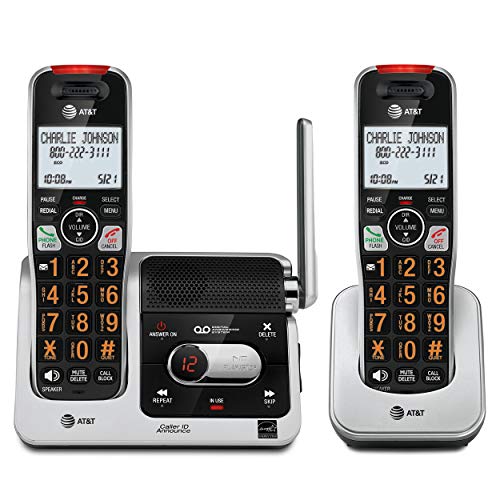
Pros
- 2-inch screen with high-contrast text for easier reading
- Automatic robocall blocking without first-ring delays
- 22-minute digital answering machine for message storage
- Full-duplex speakerphone on handset for natural conversations
- Lighted keypad for low-light visibility
Cons
- Only 2 handsets included, may need more for larger homes
- Requires landline service, not compatible with cell-only households
- Cordless design means handsets need regular charging

Pros
- 6.75-inch display is significantly larger than standard phones
- Pre-installed SIM card eliminates setup complexity for users
- 24/7 access to Lively's caring team for non-emergency support
- Real-time call captioning makes conversations more accessible
Cons
- Only works with Lively phone service, limiting carrier choices
- Requires Lively service plan subscription for full functionality
- Limited to Lively ecosystem rather than standard Android apps
A Closer Look at Our Top Pick
After comparing published specifications, the AT&T cordless phone with robocall blocker stands out for homes with a working landline. It includes 2 handsets with a 2-inch screen that displays large, high-contrast text, making caller ID and incoming numbers easier to read in any light. The automatic robocall blocker works without delays, so your parent does not have to see the call coming to benefit from protection. The 22-minute answering machine stores messages digitally, so there is no cassette to replace or rewind.
The full-duplex speakerphone on each handset lets both people speak and hear naturally, which many older adults find less tiring than holding the phone to their ear. The lighted keypad glows in dim rooms, and the system covers a wide range in most homes. The main limitation is that it requires an active landline, which increasingly fewer households maintain. If your parent lives alone in a larger home and often needs a phone in multiple rooms, you may want to add a third handset separately, since only 2 come in the box.
Find Your Situation
- the Panasonic Cordless Phone: Best for homes with an active landline where robocall blocking is the top priority. It blocks up to 1,000 unwanted calls with a one-touch button. Watch out: the one-ring scam protection requires your parent to see and confirm the incoming call on screen before it blocks.
- the AT&T AT: Best for landline users who prioritize easy reading and hands-free conversation. The 2-inch high-contrast screen and automatic robocall blocking work together without extra steps. Watch out: cordless handsets need regular charging, and you may outgrow 2 handsets in a larger home.
- the LIVELY Jitterbug Smartphone: Best for older adults moving away from landlines or those who want one device to handle calls, texts, and emergencies. The 6.75-inch screen is significantly larger than standard phones, and 24/7 support staff answer non-emergency questions anytime. Watch out: it only works with Lively’s phone service and plan, and you cannot switch carriers.
How We Narrowed It Down
We compared published specifications and feature lists for cordless landline phones and smartphones marketed to older adults. We did not handle or test the products ourselves. We excluded basic flip phones with tiny screens, phones without call-blocking features, and devices designed primarily for children. We also ruled out phones without answering machines or speakerphone options, since these features help many older adults manage their calls independently. If your parent has hearing loss or balance concerns, asking a doctor or physical therapist for guidance on using the phone safely at home is wise. For additional local support resources, the National Institute on Aging provides information on communication and independence in daily life.
What to Look For
Screen size matters more than you might think
A screen of at least 2 inches with high-contrast text means fewer squinted eyes and less frustration. Smartphone screens range from 6 to 7 inches, while cordless phone screens are typically 1 to 2 inches. The larger the screen, the easier it is to read caller ID, incoming numbers, and on-screen menus at a glance, even if your parent usually wears glasses, unlike wireless TV headphones.
Robocall blocking protects against scams
Most phones for older adults now include automatic robocall blocking. Some block calls silently in the background, while others alert your parent with a banner on screen before ringing. Look for systems that block up to 1,000 calls and do not require your parent to act before the block takes effect. This feature alone can reduce stress and protect against financial scams targeting older adults.
Illuminated keypads help in any light
A keypad that lights up makes dialing easier in bedrooms, kitchens, and rooms with low natural light. All 3 phones here include this feature. The light typically stays on briefly when you press a button, so you can see what you are dialing without draining battery life, especially on large-button phones.
Answering machines keep messages safe
Digital answering machines store 15 to 22 minutes of messages without tape or cassettes. They are more reliable than older machines and work even if the power flickers. Your parent can replay important messages, delete spam, and never worry about running out of recording space in the middle of an important call.
Speakerphone quality affects daily comfort
A full-duplex speakerphone means both people can speak and hear at the same time, just like a normal conversation. This feels more natural and causes less strain on the neck and ears than holding a handset. Cordless phones with speakerphones reduce fatigue during longer calls with family or doctors, as can phones for hearing loss.
Before you buy: check your home setup
If your parent uses a landline, either the Panasonic or AT&T cordless phone will work immediately when plugged in. If your parent no longer has a landline or lives in a cell-only household, the LIVELY Jitterbug Smartphone is the only option among these 3. Make sure your parent is ready to charge a smartphone daily and comfortable with a larger device. The Eldercare Locator can help you find local support if your parent needs hands-on help learning a new phone.
When this is not enough: add safety features
If your parent lives alone and falls frequently, a phone alone may not be enough. Cordless and smartphones require your parent to reach the phone and dial or tap the screen. Fall-alert devices and medical alert systems are separate products that automatically contact help if your parent falls. A phone is best paired with other safety tools if mobility or balance is a concern.
Quick Tips for Choosing
- Test the phone in your parent’s home before committing to a plan or purchase. Ask if the store will let you hold it and pretend to make a call.
- Check that your parent can see the screen clearly in their bedroom and kitchen, where phones are used most.
- If your parent lives with a spouse or roommate, confirm 2 handsets will reach both parts of the home, or plan to buy additional handsets.
- Ask about activation: cordless landline phones plug in and work immediately, while smartphones may require a plan setup with customer service.
- Consider your parent’s comfort with charging. Cordless handsets need charging every 1 to 2 days, while smartphones need daily charging.
- Keep the instruction manual nearby or laminate a one-page quick-start guide with your parent’s most-called numbers and emergency contacts.
Frequently Asked Questions
Do I need a landline to use a cordless phone?
Yes, cordless landline phones require an active landline connection. They plug into a wall jack where your landline service connects. If your parent does not have a landline or is moving away from one, a smartphone is the better choice.
What is the difference between a cordless phone and a cell phone?
Cordless phones work within your home using a landline signal. Cell phones work anywhere using a wireless carrier’s network. Cordless phones do not require a monthly service plan beyond what you already pay for a landline, while smartphones require a monthly cellular plan, including senior cell phones.
Can my parent use a smartphone if they have never owned one before?
It depends on your parent’s willingness to learn and the support available. Some seniors transition smoothly with a family member’s help, while others prefer the familiarity of cordless landlines. Many smartphone companies for seniors offer 24/7 phone support to walk users through common tasks.
How often do cordless handsets need charging?
Most cordless handsets hold a charge for 7 to 10 hours of talk time, which means charging once every 1 to 2 days for average use. If your parent talks several hours a day, nightly charging is safest to avoid a dead battery during an important call.
What is robocall blocking, and does it work?
Robocall blocking uses a database of known spam and scam numbers to stop unwanted calls before they ring. It is very effective, but new scam numbers appear constantly, so no system blocks every call. Automatic blocking is more convenient than manual blocking, since your parent does not have to do anything to benefit.
Can my parent record phone calls?
Some cordless phones include 2-way call recording, which lets your parent save and replay conversations. Laws about recording vary by state, so check your local rules before using this feature to capture important medical or legal conversations.
What happens if my parent forgets to charge a cordless handset?
If a handset dies, your parent can still use other handsets in the home. If all handsets are dead, your parent cannot make or receive calls from that phone system. Keeping one handset on a charger at all times and backing up with a charged spare handset is a simple solution.
Do smartphone plans for seniors cost more?
Senior smartphone plans vary in price and what is included. Many include 24/7 support, simplified menus, and pre-installed SIM cards. Compare the total cost of the phone plus monthly plan to what your parent already pays for their current service before switching.
Can my parent use a smartphone without a SIM card?
Most smartphones require a SIM card to connect to a cellular network. However, some senior smartphones come with a pre-installed SIM card so your parent does not have to handle this step. Always ask whether a SIM card is included before buying.
What if my parent has hearing loss?
All the phones here include speakerphone and volume boost features. Some also offer real-time call captioning, which displays a transcript of what the caller is saying on screen as the conversation happens. Talk to your parent’s doctor about hearing aids that pair with phones for even better clarity.
Which One to Start With
The right choice depends on whether your parent has a working landline and how comfortable they are with technology. If your parent has an active landline and wants to keep using it, start with the AT&T cordless phone with robocall blocking. It offers the easiest setup (plug in and use immediately), the most readable screen for a landline phone, and automatic scam protection without your parent having to lift a finger. The 2-inch high-contrast display is large enough to read caller ID from across a room, and the full-duplex speakerphone means your parent can have natural conversations without holding the handset to their ear for hours.
If your parent has already moved away from landlines or lives in a cell-only household, the LIVELY Jitterbug Smartphone is your only option among these 3. The 6.75-inch screen is noticeably larger than standard phones, which makes a real difference if your parent squints or has vision changes. The pre-installed SIM card means your parent does not have to figure out carrier plans or SIM card installation on their own. Perhaps most important, 24/7 access to Lively’s support team means your parent can call with questions about how to use the phone, not just technical problems. This human support makes a difference for older adults learning a new device for the first time.
If your parent values blocking robocalls above all else and is willing to learn a few extra steps, the Panasonic Cordless Phone offers the most aggressive robocall protection, blocking up to 1,000 calls with a one-touch button. It also includes 2-way call recording, so your parent can save important conversations with doctors, family, or support services. The main drawback is that your parent has to see the call coming on screen to confirm the block, which requires paying attention when the phone rings. This extra step works fine for some older adults but adds friction for others.
Start by asking your parent a simple question: “Do you want to keep using a landline, or are you ready to switch to a cell phone?” Their answer narrows the choice immediately. Then ask whether they prefer larger screens or simpler setup. The AT&T and Panasonic cordless phones work best for landline lovers, while the LIVELY Jitterbug suits anyone moving to cellular service or anyone who wants one device that works everywhere.