

Location support works only when the tracker is charged, carried, connected, and accepted by the person wearing it, which is why the best gps trackers for dementia patients are not all the same. A tiny Find My tag such as the SxingUxing GPS may suit keys, coats, or a bag, while a fuller 4G device such as the PAJ GPS Tracker adds an SOS button, voice messages, and 30-second updates while moving. Families should match the device to daily habits first, then think about battery life, water resistance, phone platform, and fees. The right choice is the one your parent will actually keep with them during ordinary routines.

Pros
- Compact 1.3 x 1.3 x 0.3 inch size fits bags
- Light 0.4 oz design suits keys, coats, and backpacks
- IP68 waterproof rating handles rain and snow
Cons
- iOS-only Apple Find My support excludes Android phones
- 1.3-inch tag still needs secure placement on clothing

Pros
- 0 monthly fees and 0 SIM cards for core tracking
- IP68 waterproof rating handles rain and splashes
- 7-day route history helps review recent outings
- 2 phone platforms: Android and iPhone support
Cons
- Tracking depends on carrying the wristband or keychain
- QR sharing requires others to scan a code in the app
- No SIM design may rely on app-based connection limits

Pros
- 0 monthly subscription charges for caregiver tracking
- 0 extra apps needed; use Find My on an iOS device
- 0 added service plans for kids, teens, or elderly users
Cons
- Limited to iOS users through the Find My app
- Hidden tracker format may be uncomfortable for some wrists

Pros
- 4G location updates every 30 seconds while moving
- 3,000 mAh battery lasts up to 10 days in normal use
- IP65 water resistance handles everyday outdoor use
- Works in 100+ countries with no roaming fees
- Route history available for up to 365 days
Cons
- Requires a subscription from about 5.50 USD monthly
- Location updates rely on 4G coverage and app access
- IP65 water resistance is not for swimming or showers
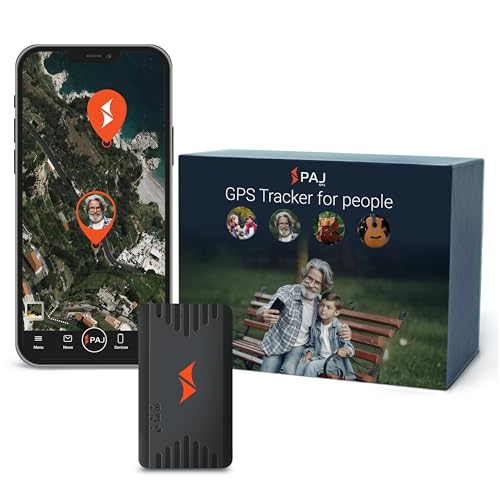
Pros
- 4G tracking has no stated distance limit for travel
- 365 days of track memory helps review routes
- Approx. 5-day battery life reduces charging
- 24/7 multilingual support for account help
Cons
- Requires a subscription for ongoing SIM connectivity
- Approx. 5-day battery may still need frequent charging

Pros
- Up to 30 days of battery life per charge
- Fabric pouch includes 2 pins for wearing options
- Works in 120+ countries with free roaming
- Magnetic key supports safer removal by caregivers
Cons
- Requires carrying or wearing the tracker daily
- Fall alerts may need caregiver review for context
- Monthly service fee still adds ongoing cost
A Closer Look at Our Top Pick
For many families, a 4G tracker with SOS and voice messages is the most practical starting point on paper because it combines active location updates with a way for your parent to signal for help. The PAJ GPS Tracker updates every 30 seconds while moving, has a 3,000 mAh battery, and lasts up to 10 days in normal use. That balance matters when a caregiver wants more than a tag attached to keys, but still needs a device that can fit into daily life without charging every night.
The trade-off is the ongoing subscription, which starts from about 5.50 USD monthly, and the device depends on 4G coverage and app access. Its IP65 water resistance is useful for everyday outdoor use, but it is not meant for swimming or showers. The route history can go back up to 365 days, which may help a family notice patterns in walks, errands, or visits. For a household that wants location updates, an SOS button, and short reassurance messages in 1 device, this is the clearest full-featured option among the 6 products compared here.
Find Your Situation
- the SxingUxing GPS: suits an iPhone household that wants a 1.3-inch, 0.4 oz tag for keys, a coat, or a bag with no SIM, subscription, or monthly fee. Watch out: Apple Find My support excludes Android phones, and the tag still needs secure placement.
- the galawelly GPS: suits families who want both wristband and keychain options, Android and iPhone support, and 7-day route history with 0 monthly fees. Watch out: the no SIM design may have app-based connection limits, and your parent must carry or wear it.
- the Generic GPS: suits iOS caregivers who want a watch band style tracker with 0 monthly subscription charges and 0 extra apps beyond Find My. Watch out: the hidden tracker format may not feel comfortable for every wrist.
- the PAJ GPS Tracker: suits families who want 4G updates every 30 seconds while moving, an SOS button, voice messages, and up to 10 days of battery life. Watch out: it requires a subscription and relies on 4G coverage.
- the PAJ GPS PAJ: suits caregivers who want a 41-gram pocket tracker with safe-zone alerts, 365 days of track memory, and support in more than 1 language. Watch out: the subscription is required for ongoing SIM connectivity.
- the Tack GPS Plus: suits families who want up to 30 days of battery life, fall alerts, SOS alerts, and a pouch with 2 pins for wearing options. Watch out: the tracker still has to be worn or carried every day, and alerts may need caregiver review for context.
How We Narrowed It Down
We compared published specifications rather than handling the products. We focused on the details that affect everyday caregiving: battery life, phone compatibility, water resistance, wearing style, route history, SOS features, fall alerts, and subscription needs. We excluded options that did not give enough basic tracking information to compare fairly with these 6 devices, and we gave less weight to products that depend on a single habit, such as always carrying keys. For fall concerns, the National Institute on Aging notes that strength and balance work can be part of a broader safety plan, so it is wise to discuss home safety and mobility with a doctor or physical therapist through the NIA falls prevention guidance. A tracker can support check-ins, but it should sit inside a wider plan for routines, transportation, clothing, charging, and local help.
What to Look For
Start with how your parent actually leaves home
A tracker only helps when it is with the person, so begin with the object your parent already carries. If your parent always takes keys, a 0.4 oz tag can be less intrusive than a wristband. If your parent changes coats often, a pouch, lanyard, or pocket device may be easier to keep consistent. Families often do better choosing for 1 reliable routine than trying to cover every possible outing, including GPS for elderly drivers.
Decide whether you need a tag or active 4G tracking
Find My style tags can avoid a SIM, subscription, and monthly fee, which keeps setup simple for iOS households. Active 4G trackers can add features such as 30-second updates while moving, safe-zone alerts, voice messages, or broader travel support. The clearer choice depends on whether you need occasional location checks or more active caregiver notifications. If you want more than a keychain reminder, a 41-gram pocket tracker with safe-zone alerts is worth comparing against tag-style choices.
Check phone compatibility before anything else
Some trackers in this group are limited to iOS through the Find My app, while 1 app-based option supports both Android and iPhone. That matters because the caregiver phone is the control point for daily check-ins. A device with 0 extra apps may be simpler for an iPhone household, but it will not help an Android caregiver if the tracker depends on Apple Find My. Confirm the phone platform before weighing battery life or water resistance.
Think about charging as a caregiving task
Battery life ranges widely across these products, from about 5 days to up to 30 days. A shorter battery schedule can work if a caregiver already visits often or handles charging as part of a routine. A longer battery can reduce friction, especially when the tracker is worn in a pouch or lanyard. The best choice is usually the one that matches your family’s real charging rhythm, not the largest number on paper.
Before you buy, talk through consent and comfort
Comfort is not a small detail for dementia care, because a wristband or hidden tracker may feel bothersome to some people. A 1.3-inch tag on a familiar bag may feel less noticeable than a watch band, while a pouch with 2 pins gives more clothing options. If your parent can participate in the decision, offer 2 practical choices and keep the explanation calm. A device that is accepted is more useful than one with extra features that gets left behind.
Plan for water, weather, and daily wear
Water resistance ratings differ, and the details matter. IP68 options can handle rain and splashes, while IP65 can handle everyday outdoor use but is not for swimming or showers. If your parent walks outside in changing weather, a higher water rating may reduce worry about rain or snow. Still, placement matters as much as the rating, because a tracker clipped poorly to clothing can be misplaced even if it handles water.
When this is not enough, add people and local support
A tracker is a tool, not a full care plan, especially when wandering, transportation, or home safety concerns are growing. Families may need neighbors, adult day programs, transportation help, or respite services in addition to location alerts. The public Eldercare Locator can connect older adults and caregivers with local support services by phone at 1-800-677-1116. If your parent has new confusion, repeated route changes, or mobility concerns, speak with a clinician and build a plan that includes more than 1 layer of support.
Quick Tips for Choosing
- Pick the wearing style before comparing features.
- Choose iOS-only trackers only for iPhone households.
- Use 4G tracking when you need active updates.
- Match battery life to your real charging routine.
- Check water resistance for rain, splashes, and outdoor walks.
- Discuss comfort and placement with your parent when possible.
Frequently Asked Questions
Can a GPS tracker replace supervision?
No. A tracker can help a caregiver check location, but it cannot make decisions, offer hands-on help, or confirm that your parent is comfortable. It works best as 1 part of a broader routine, such as door alarms for dementia.
Do all GPS trackers need a monthly fee?
No. Some products use Apple Find My or app-based designs with 0 monthly fees, while 4G trackers, including elderly GPS trackers, usually need a subscription for SIM connectivity. The trade-off is often between lower ongoing cost and more active location features.
Is a wristband better than a keychain tracker?
It depends on what your parent will consistently wear or carry. A wristband stays with the body when accepted, while a keychain or bag tag may feel more familiar but can be left behind.
What battery life should I look for?
Look for a battery schedule your family can maintain. In this group, battery claims range from about 5 days to up to 30 days, so the right number depends on who will charge it and how often.
Are fall alerts the same as emergency help?
No. Fall alerts can notify caregivers, but they still need review and follow-up for context. They should not be treated as a diagnosis or a guarantee that every event will be understood correctly.
What does an SOS button do?
An SOS button lets the person press the device to send an alert through the connected service or app. It can be helpful when your parent understands the button and can use it during a routine concern.
How important is water resistance?
Water resistance matters for rain, snow, splashes, and daily wear. Ratings such as IP68 and IP65 describe different levels of protection, so match the rating to how and where your parent usually wears the tracker.
Should I choose route history?
Route history can help caregivers review recent outings and notice repeated paths. In this group, route history ranges from 7 days to 365 days, depending on the device.
Can more than 1 caregiver check the location?
Some products support shared visibility through an app or QR sharing process. The setup should be simple enough that the main caregivers can use it without confusion during a busy day.
What if my parent refuses to wear it?
Try a less noticeable placement, such as a coat, bag, or keys, if that fits the device design. If refusal continues, focus on routines, local support, and clinical guidance rather than forcing a device that will not be carried.
Which One to Start With
If you want the most rounded starting point and can accept a subscription, start with the PAJ GPS Tracker. On paper, it gives caregivers the strongest mix of active features: 4G updates every 30 seconds while moving, an SOS button, short voice messages, a 3,000 mAh battery, and up to 10 days of normal use. That makes it a sensible first look for families who want location support plus a simple way for your parent to send an alert.
If your household is iPhone-based and you mainly need a small tracker for a coat, bag, or keys, choose the SxingUxing GPS instead. Its 1.3-inch size, 0.4 oz weight, IP68 rating, and no monthly fee make it the simplest low-friction choice, as long as Android support is not needed. For families who are most concerned about charging, a tracker bundle with up to 30 days of battery life is the better place to start, especially if a pouch, lanyard, SOS alerts, and fall alerts fit your caregiving routine. The decision is not about the longest feature list. It is about choosing the device your parent will carry, your family will charge, and your caregivers can understand quickly.